Wall-E
A terminal-first wallpaper manager with smart sources, background scheduling, and history tracking.
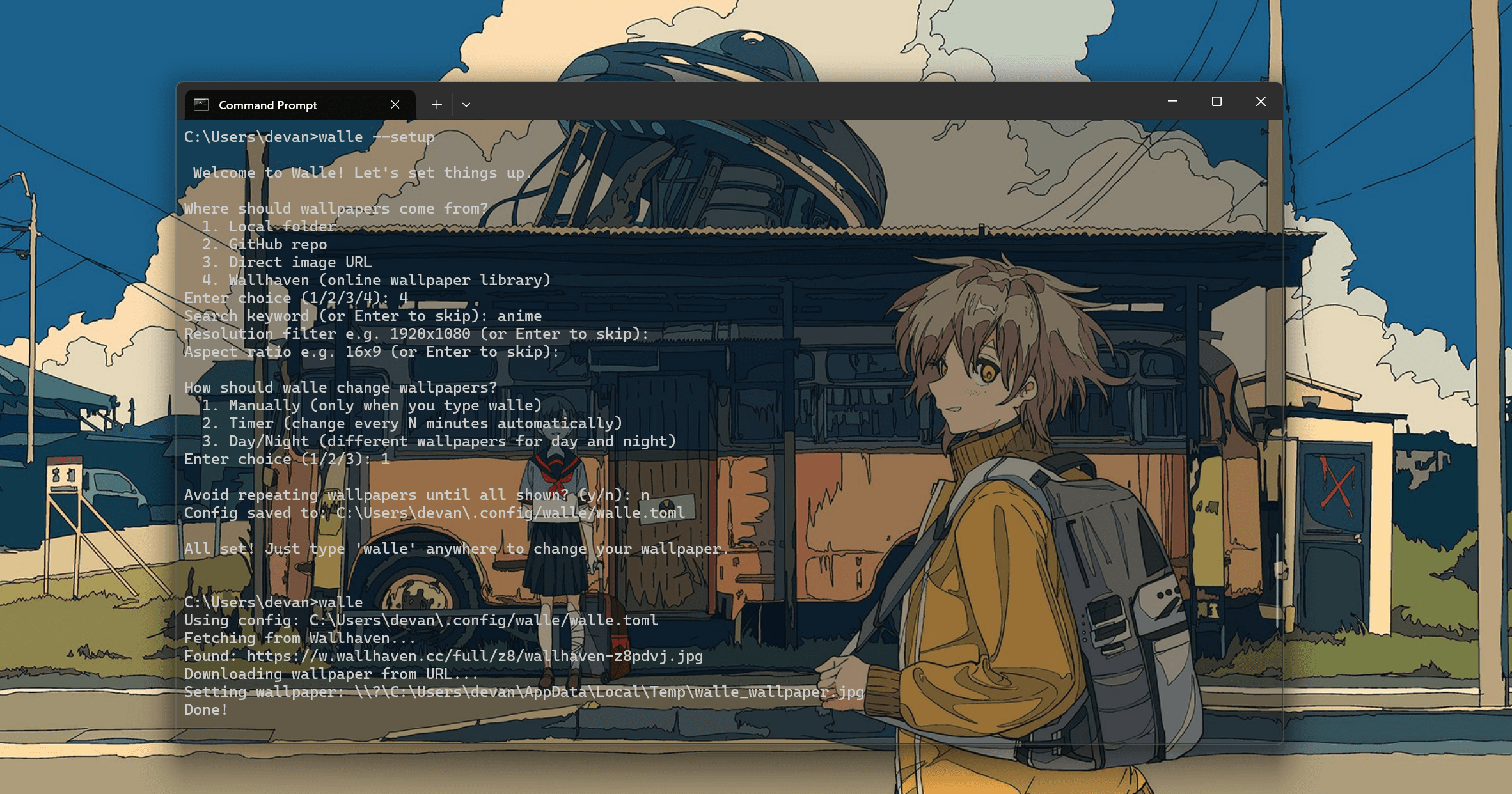
Overview
Wall-E is a Rust CLI tool that changes your wallpaper from multiple sources — local folders, GitHub repos, direct image URLs, or the Wallhaven API — with a single command from any terminal.
It supports background scheduling so wallpapers rotate automatically without keeping a terminal open, and tracks history and favourites across sessions using a local JSON store.
Problem
Wallpaper managers are almost universally GUI-only, making them impossible to automate, script, or use in minimal setups.
There was no single tool that could pull wallpapers from multiple sources — local, remote, and API-driven — while running silently in the background across Windows, macOS, and Linux.
- —GUI wallpaper tools can't be scripted or integrated into dotfile workflows.
- —Auto-rotation tools require keeping a terminal open or manually configuring system schedulers.
- —No existing CLI tool unified local folders, GitHub repos, and wallpaper APIs under one interface.
- —Day/night wallpaper switching required separate tools or manual intervention.
Constraints
True cross-platform support
Windows, macOS, and Linux each handle wallpaper setting differently. The wallpaper crate was used to abstract this, but Windows additionally required absolute paths and specific process creation flags for background spawning.
Background process without a runtime
Auto-rotation needed to survive terminal closure. Rather than requiring a system service, Wall-E spawns a detached child process of itself using OS-specific flags, saves the PID, and exposes --stop and --status commands to manage it.
Multiple remote sources with no auth
Wallhaven required no API key for SFW content but needed careful URL construction. GitHub's API required a User-Agent header and a custom URL transformation from web URLs to API endpoints, including subfolder support.
Config that works from any directory
Since walle is invoked from anywhere in the terminal, the config needed to live at a fixed path (~/.config/walle/walle.toml) with CLI flags always taking priority over stored values.
Key Decisions
Rust for zero-cost startup and cross-platform reach
Rust compiles to a single native binary with near-instant startup — important for a tool invoked frequently. The ecosystem's crates (clap, reqwest, serde, wallpaper) covered every requirement without pulling in a heavy runtime.
Daemon pattern over system schedulers
Rather than requiring users to configure Task Scheduler or cron, Wall-E spawns itself as a detached background process with --daemon, making auto-rotation a single flag rather than a multi-step system configuration.
Setup wizard on first run
Instead of requiring users to hand-write a config file, Wall-E detects a missing config and runs an interactive wizard that writes ~/.config/walle/walle.toml automatically — covering source, mode, interval, and no-repeat preference.
History and favourites as a local JSON store
Every wallpaper set is logged to history.json with its source and timestamp. This powers the --history and --favourites commands and the no-repeat shuffle mode, which tracks seen wallpapers and resets the cycle when all have been shown.
Results
- —Delivered a fully cross-platform CLI tool installable with a single cargo install command.
- —Background auto-rotation works without keeping a terminal open or configuring any system scheduler.
- —Wallhaven API integration supports keyword, resolution, and aspect ratio filtering with random selection from results.
- —GitHub repo support handles both root-level and subfolder sources via automatic GitHub API URL transformation.
- —First-run setup wizard means zero manual config file editing for new users.
- —No-repeat shuffle mode cycles through all wallpapers before repeating, with state persisted across sessions.
Takeaways
- —Rust's cargo ecosystem made cross-platform CLI development significantly faster than expected — most platform differences were handled by existing crates.
- —The daemon pattern (spawning self as a detached process) is a practical alternative to system service registration for user-facing tools.
- —Good defaults and a first-run wizard matter more than documentation for CLI tools — if setup is automatic, adoption friction disappears.
- —Scoping sources (local, GitHub, URL, API) behind a single --source flag kept the interface simple despite the complexity underneath.